


Route Planner - GetWay
3.839.00 Reviews
App Specs
- Version
- 1.1.30
- Updated On
- License
- Free
- Downloads
- 100,000+
- Developer
- Logi Way
- Categories
- Maps & Navigation
- Platform
- Android
Screenshots
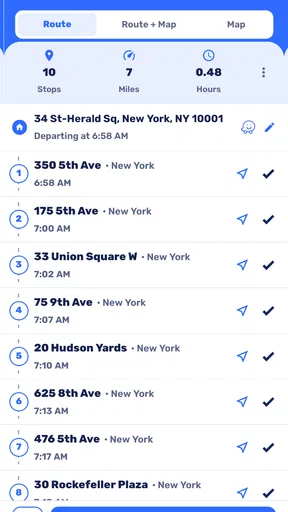
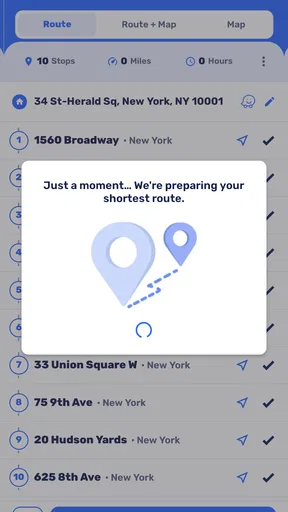
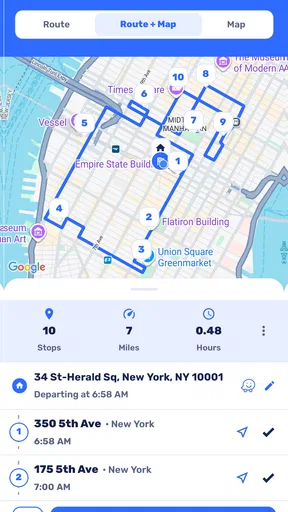
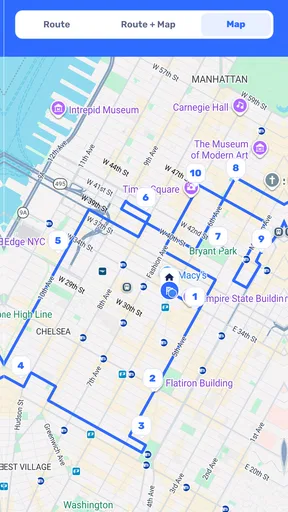
 Analysis by AppCompare
Planning a journey can become surprisingly tiring when the route is not the real problem. Sometimes I already know where I want to go, but I still need a quicker way to organize the trip, compare possible paths, and leave with a clearer idea of the distance ahead. Route Planner - GetWay approaches that everyday need as a Maps & Navigation app from Logi Way. It is free to install, suitable for Everyone, and built around one straightforward purpose: helping me plan a route before I set off.
After spending time with it, I see the app as a focused companion rather than a complete replacement for every navigation tool. Its strongest appeal is the planning stage. I can think through a journey before moving, which is useful for errands, short road trips, repeated work visits, or any day when taking an unnecessarily long route would be frustrating. The experience is simple enough for a first-time user, although it rewards a little patience when checking the result instead of accepting the first plan automatically.
Getting from installation to a useful route
The first thing to understand is what this app is trying to do. The store summary describes GetWay as a way to make travel faster and shorter, while its short description identifies it as a route planner. In practical terms, I would open it when I want to prepare a journey and make a sensible decision about how to get from one place to another. That is a narrower promise than being an all-purpose travel platform, and I think that clarity is helpful.
The app is currently at version 1.1.30 and works on Android devices running version 5.0 or later. That broad compatibility makes it approachable for people using older phones, not only those with recent hardware. It has passed the early discovery stage as well, with over 100 thousand installs, while its average rating sits at 3.8 from around 386 ratings and 39 written reviews. I read that combination as a sign of a useful but not universally loved tool: enough people are using it to make it worth considering, but expectations should remain realistic.
Because the app is free, I can try its basic experience without committing money at the start. There are in-app purchases, with individual items ranging from around fourteen dollars to nearly three hundred seventy dollars, so I would pay attention to any purchase screen rather than tapping through it casually. For someone testing a route planner, the sensible approach is to install it, complete a small local route first, and only consider paid options if the app proves valuable for a regular travel routine.
What I would prepare before opening it
My advice to a first-time user is to begin with a simple journey that has a clear starting point and destination. A familiar trip is better than a complicated holiday itinerary because I can judge the proposed route against what I already know. I would also decide what matters most before planning: the shortest path, a simpler drive, fewer confusing turns, or a route that fits several errands into one outing.
That small decision changes how useful the result feels. A route can be shorter on a map while being less comfortable in real life because it passes through awkward streets or creates extra decisions. GetWay is most helpful when I use it as a planning assistant and then apply my own knowledge of the area. I do not treat a calculated route as an unquestionable instruction.
Worth Reading Before You Choose

EA SPORTS FC Mobile 26 Is a Bigger Football Game, but It Takes Time

Flipboard Shows What News Apps Must Do Beyond the Feed

Switching to Android Auto Means Rethinking Your Driving Routine

Google Calendar Makes a Crowded Week Easier to Manage

Ludo King Makes the Most of the Minutes Between Plans

Baby Panda World Brings Quick Play to Modern Phones, but Its Game Library Feels Busy
For a first setup, I would enter the starting location carefully instead of assuming the app has guessed it perfectly. If I am leaving from home, a saved or familiar address is easy to check. If I am already outside, I would verify the starting point against a visible landmark, street name, or nearby intersection. This is one of the most important habits with any route planner: a small error at the beginning can make the rest of the journey look wrong even when the route calculation itself is reasonable.
I would then enter the destination in a way that distinguishes it from similarly named places. A business name may have multiple branches, and a street may appear in more than one town. When the destination matters, I prefer a complete address or a clearly recognizable place rather than a vague label. This extra moment of checking is especially worthwhile when I am planning a delivery, a medical appointment, or a meeting where arriving at the wrong branch would waste the entire benefit of a shorter route.
The first successful action should be deliberately small
For my first meaningful test, I would plan a route I already know well, perhaps from home to a supermarket or from work to a familiar café. Once the route appears, I would compare it with my normal choice instead of immediately following it. Does it avoid an unnecessary loop? Does it make the destination easier to reach? Does it look practical at the time I expect to travel? That comparison gives me a useful answer quickly and does not depend on a long journey.
This is also where I notice the difference between planning and live navigation. A route planner can help me choose a path, but I still need to understand how I will use that information while moving. If I am driving, I should review the route before starting and avoid handling the phone while in motion. If I am walking or cycling, I can pause somewhere safe to check the plan. I find the app more reassuring when I treat the planning screen as preparation rather than as an excuse to make last-second decisions.
A practical workflow is to plan the whole outing rather than only the final destination. For example, if I need to collect a parcel, buy groceries, and visit a friend, I can think about the order of those stops before leaving. Even if I ultimately enter each destination separately, the planning process helps me notice backtracking. The non-obvious advantage here is not a hidden button or a special mode; it is the discipline of using the app to test the shape of the day, not merely to find one address.
I also recommend checking the route from a second perspective. First, I look at the overall path. Then I focus on the beginning and end, because those areas are where a route can feel least intuitive. The first few turns determine whether I leave in the right direction, while the final approach determines whether I can actually identify the destination. A route that looks excellent across a broad map may still be inconvenient at either end.
Where a first-time user may hesitate
The most common confusion with a planning tool is assuming that “shortest” automatically means “best.” I would not make that assumption. A shorter route may involve more turns, less familiar roads, or a final approach that is difficult to recognize. If I am travelling with children, carrying heavy items, or arriving somewhere under time pressure, a slightly longer but simpler plan may be the better choice. My recommendation is to judge the route by mental effort as well as distance.
Another point that deserves attention is the difference between a planned route and changing conditions on the ground. Road works, temporary closures, weather, events, and congestion can alter a journey after I have prepared it. I therefore use GetWay to reduce uncertainty, not to eliminate the need for observation. Before leaving, I check that the route still makes sense, and during the journey I follow legal, safe driving practices rather than staring at the screen.
Destination names can create friction too. If the app presents several similar results, I slow down and identify the correct one before continuing. This is particularly important for large shopping areas, apartment complexes, campuses, and businesses with more than one location. A route beginning from the wrong place or ending at a similarly named place can appear perfectly normal at first glance. The useful habit is to confirm both ends of the journey, not just the destination.
I would also avoid judging the app from one complicated route. A first attempt involving several stops, an unfamiliar region, and a tight schedule is a poor test because too many variables are involved. Start with one origin and one destination, learn how the route is presented, and then increase the complexity. This staged approach makes the path from installation to first success much less intimidating.
How it fits beside familiar alternatives
Most people already know a general mapping app, so the natural question is why they should try a separate route planner. In my view, GetWay makes the most sense when I want a focused planning experience rather than a large collection of map-related services. A general maps app may be better for live traffic context, business details, reviews, transit information, or exploring places around a destination. A dedicated planner can feel less distracting when my immediate task is simply to organize a route.
The trade-off is that I should not expect one tool to excel at every part of travel. If I need rich local discovery, highly detailed place information, or a broad travel guide, a full mapping platform may be the stronger choice. If I already have a navigation app that handles my preferred routine perfectly, GetWay may not add enough value to justify changing habits. Its appeal is greatest for someone who wants to think through routes in a direct, uncomplicated way.
I would also distinguish between occasional planning and professional route management. For a courier, sales representative, or service worker visiting many customers, the important questions include stop optimization, scheduling, sharing, and operational tracking. I would not choose this app solely because it can plan one route if my work depends on a complete fleet or delivery workflow. For personal trips and modest daily organization, however, its focused purpose is easier to appreciate.
Everyday situations where the app earns its place
Imagine that I have an appointment across town after work. I know the destination, but I also need to stop at a store on the way home. Instead of leaving and improvising, I can use GetWay to examine the trip in advance, decide which stop makes sense first, and avoid returning through the same area unnecessarily. The value is not only saving road distance. It is leaving with a plan that matches the order of my responsibilities.
Another useful situation is visiting an unfamiliar address for the first time. Before the day of the appointment, I can inspect the route and identify whether the final approach looks easy to recognize. If the destination is in a large complex, I can allow extra time to orient myself instead of assuming that reaching the correct street means the journey is finished. This is a small but meaningful improvement for anyone who dislikes arriving stressed.
Families can use the same approach for weekend outings. I would plan the route before the children are in the car, compare it with the familiar alternative, and decide where a break or stop might fit. The app does not replace common sense about rest, weather, or safety, but it can help turn a vague outing into a sequence I understand. That preparation is especially useful when the driver is the person who would otherwise be trying to make route decisions on the move.
For walkers and cyclists, I would be more selective. A route that is efficient for a vehicle is not automatically pleasant or safe for a person on foot or a bicycle. I would use the app as a starting point, then consider crossings, road conditions, lighting, and the comfort of the surroundings. This is an important limitation: route efficiency is not the same as suitability for every travel mode.
Three habits that make the planning result better
First, I plan at the same level of detail as the journey requires. For a quick trip, a single destination is enough. For a day with several obligations, I write down the stops and test their order rather than relying on memory. This prevents the common mistake of optimizing one leg while making the complete outing longer.
Second, I compare the suggested route with my own local knowledge. I know which junction is stressful, which entrance is easy to miss, and which road becomes inconvenient at certain times. The app contributes a fresh calculation, while I contribute context. The strongest result comes from combining both instead of treating either one as infallible.
Third, I review the route before I am under pressure. Planning five minutes before departure leaves little room to correct a mistaken address or rethink an awkward turn. A quick check earlier in the day gives me time to adjust the destination, choose a different stop order, or decide that another mapping option is more appropriate. This is a simple workflow, but it is the difference between using a planner thoughtfully and using it as a last-second rescue.
Who should try it, and who should skip it?
I would recommend Route Planner - GetWay to someone who wants a dedicated way to prepare ordinary journeys and prefers a direct tool over a crowded travel dashboard. It is a reasonable fit for occasional drivers, people organizing errands, users with older Android phones, and anyone who wants to compare a planned route with their usual habit. The free entry point makes experimentation easy, provided I remain alert to the presence of optional in-app purchases.
I would be less enthusiastic for someone who expects a complete replacement for a major mapping service. If live journey context, detailed place discovery, specialized travel modes, or advanced multi-stop work planning are central to your day, another option may suit you better. I would also skip it as my only source of guidance for unfamiliar or safety-sensitive journeys until I had tested it locally and understood how its route results fit my needs.
The average rating of 3.8 suggests a mixed but credible reception rather than universal approval. I think that matches my own conclusion: the app is useful when its focused role matches the task, but it is not a magic answer to every navigation problem. The developer, Logi Way, has kept the central idea easy to understand, yet the user still has to verify addresses, interpret the route, and account for real-world conditions.
My final take after using it
Route Planner - GetWay is best approached as a calm preparation tool. I open it before travelling, enter the journey carefully, inspect the route, and decide whether it makes practical sense. That process can save time and reduce the mental clutter of an improvised trip, especially when I have several errands or an unfamiliar destination.
What I like most is the clear starting point for a first-time user: test one familiar route, learn how the result feels, and then use it for more demanding plans. What holds it back is the need for personal judgement. A shorter line on a map does not guarantee an easier journey, and the app should not encourage anyone to ignore changing road conditions or safe phone use.
My recommendation is to treat GetWay as a route-planning companion, not as an unquestionable travel authority. If that distinction suits the way you travel, the free app is worth trying. It can help you turn an uncertain outing into a route you have already considered, while still leaving the final decision where it belongs: with the person making the journey.
Pros
- Plans routes with multiple stops in one trip.
- Offers clear turn-by-turn navigation for everyday journeys.
- Helps compare route options before starting your drive.
- Useful for delivery drivers and frequent travelers.
- Simple interface makes trip planning quick to learn.
Cons
- Some advanced features may require a paid subscription.
- Route accuracy depends on current map and traffic data.
- Heavy navigation use can drain your phone battery.
- May need location and other permissions to work properly.
- Coverage and features can vary by country or region.
FAQs for Route Planner - GetWay
What is Route Planner - GetWay, and who is it designed for?
Route Planner - GetWay is a navigation and trip-planning app designed to help users organize journeys, find routes, and manage stops more efficiently. It can be useful for everyday drivers, commuters, travelers, delivery workers, and anyone planning a route with multiple destinations. Before downloading, check whether its map coverage and available features support your country and preferred type of transportation.
Can Route Planner - GetWay plan routes with multiple stops?
One of the main reasons to use Route Planner - GetWay is the ability to organize trips that include several destinations instead of calculating every stop separately. Depending on the version and platform, the app may help arrange stops in a practical order and provide route guidance. Users planning complex journeys should review the maximum number of stops, route optimization options, and whether these tools require a subscription.
Does Route Planner - GetWay work offline?
Offline availability is an important consideration for anyone traveling through areas with weak mobile coverage. Route Planner - GetWay may rely on downloaded map data, cached routes, or an active internet connection, depending on the feature being used. Before starting a long trip, test the app in offline mode and confirm whether turn-by-turn directions, address searches, traffic information, and route recalculation remain available without mobile data.
Does Route Planner - GetWay provide live traffic and navigation updates?
Route Planner - GetWay can be useful for route guidance, but the exact navigation and traffic features depend on the current app version, location, device permissions, and internet connection. Live traffic, road closures, estimated arrival times, and automatic rerouting may not be available everywhere. Drivers should also compare the app’s suggestions with road signs and local regulations rather than relying on it blindly.
Is Route Planner - GetWay free to download, and are there in-app purchases?
The app may be available to download at no initial cost, but some advanced tools can be limited by advertisements, usage restrictions, premium plans, or in-app purchases. Potential paid features may include unlimited route planning, additional stops, optimization, offline maps, or an ad-free experience. Check the Google Play Store or Apple App Store listing for the current pricing, trial conditions, and subscription cancellation details before installing.


